Charlie Script: A Font That Feels Like Your Handwriting
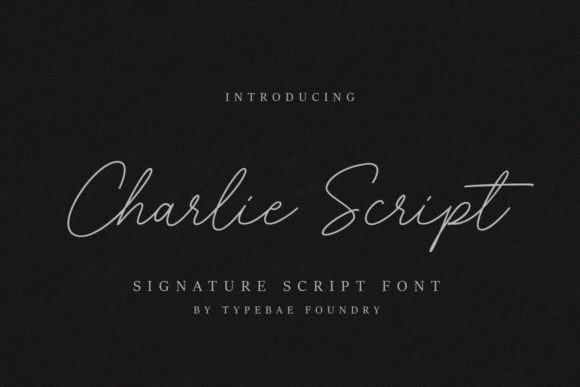
You know that feeling when you want a design to look polished, but not sterile? When you need typography that feels human, warm, and genuinely yours? That’s exactly where Charlie Script steps in. It’s a typeface that captures the fluid, natural motion of a handwritten signature—not the kind you scribble on a receipt, but the kind you’d see on a beautifully penned letter or an artist’s portfolio. If you’ve ever struggled to find a script font that doesn’t look overly formal or cartoonish, Charlie Script might just be the solution you’ve been searching for.
What Makes Charlie Script Different from Other Script Fonts
There are thousands of script fonts available today, so what sets this one apart? Charlie Script strikes a rare balance between elegance and approachability. Many script fonts lean too far in one direction—either they’re so ornate they become illegible, or they’re so casual they lack sophistication. This typeface sits in a sweet spot that works for both personal and professional projects.
The letterforms flow naturally, with just enough variation in stroke weight to mimic real pen pressure. You’ll notice subtle details: the way certain letters connect, the gentle curves in the ascenders and descenders, the organic rhythm between characters. These aren’t random flourishes—they’re carefully designed elements that give the font its authentic, handwritten feel. And because it’s PUA encoded, accessing every glyph, swash, and ligature is straightforward, even if you’re not a typography expert.
Where This Typeface Truly Shines
Let’s talk about real applications. If you’re building a brand identity for a boutique business—say a skincare line, a bakery, or a photography studio—Charlie Script can become the visual voice of your brand. Use it for your logo, your product packaging, your thank-you cards. It communicates care, attention to detail, and a personal touch that resonates with customers who value authenticity.
For content creators and bloggers, this font works beautifully for headlines, pull quotes, and featured graphics. Imagine a food blog with recipe titles set in a warm, handwritten style, or a travel journal with location names that feel like they were written in the moment. Social media graphics benefit enormously from this kind of typography—it stops the scroll because it feels different from the default fonts everyone else uses.
Designers working on editorial layouts, invitations, or print materials will find it particularly useful. Wedding stationery, event posters, menu designs, magazine features—anywhere you want to inject personality without sacrificing readability. It’s also a strong choice for digital products like e-book covers, online course materials, and downloadable planners where a handwritten aesthetic adds perceived value.
Pairing Charlie Script with Other Fonts
One of the most practical questions when choosing a display font is: what do I pair it with? Charlie Script works exceptionally well alongside clean sans serif fonts. Think of it as the personality piece, while a simple sans serif handles the body text and supporting information. This combination creates visual hierarchy without competing for attention.
For example, if you’re designing a business card, you might use Charlie Script for the business name or a tagline, then set the contact details in a straightforward typeface like Montserrat or Open Sans. The contrast between the flowing script and the structured sans serif creates a professional yet approachable layout. If your project leans more editorial, pairing it with a classic serif font can create an elegant, magazine-worthy aesthetic.
The key is testing your combinations in context. Don’t just look at fonts side by side in a design tool—mock up the actual project. See how they interact at the sizes you’ll actually use. Check readability on both screen and print. A font pairing that looks stunning at 72 points might lose its charm at 14 points, especially on mobile devices.
Readability Considerations for Real Projects
Speaking of readability, it’s worth addressing directly. Script fonts are inherently more challenging to read at small sizes than their sans serif or serif counterparts. That’s not a flaw—it’s a characteristic to work with, not against. Charlie Script performs admirably for its category, but smart designers know when and where to deploy it.
Use it generously for headlines, logos, and short phrases where its personality can shine. For longer text blocks—paragraphs, product descriptions, blog content—switch to a more legible typeface. This isn’t a limitation; it’s how professional typography works. The best designs use multiple fonts strategically, each serving a specific purpose.
Consider your audience and medium, too. If you’re designing for older readers or accessibility-focused projects, reserve script fonts for decorative elements rather than critical information. On packaging, make sure product names and essential details remain clear and easy to scan. Charlie Script excels as an accent, not necessarily as the workhorse of every layout.
Practical Tips for Getting the Most from This Font
Before you commit to any premium font for a commercial project, take a few smart steps. First, explore all the included styles and alternates. Charlie Script comes with a robust character set, and you might discover ligatures or swashes that perfectly suit your design. Spend time clicking through the glyph panel—you’ll be surprised at what’s available.
Second, always check the licensing terms. If you’re using the font for client work, merchandise, or products you sell, make sure your license covers commercial use. This is a detail that trips up many designers and small business owners, and it’s worth getting right from the start.
Third, test the font in realistic conditions. Don’t just design on a large monitor—pull it up on a phone, print a sample, view it at arm’s length. How does it hold up? Does the weight feel right? Are the connections between letters smooth or awkward? These practical checks save you from costly revisions later.
Finally, think about consistency. If Charlie Script becomes part of your brand identity, document how you use it. Specify which sizes, which colors, which contexts. A style guide—even a simple one—ensures that every touchpoint looks cohesive, from your website headers to your Instagram stories to your printed invoices.
Why Handwritten Typography Still Matters
In an era of algorithmic design and AI-generated layouts, there’s something genuinely refreshing about typography that feels made by hand. Charlie Script taps into that desire for human connection. It tells your audience that a real person is behind this brand, this message, this product. That emotional resonance is difficult to manufacture with geometric typefaces alone.
Whether you’re a freelance designer looking for a versatile script font to add to your toolkit, a small business owner crafting your first brand identity, or a marketer creating assets that need to stand out in crowded feeds, this typeface offers something valuable. It’s not trying to be everything—it’s trying to be one thing exceptionally well. And in a world of endless font options, that kind of focus is exactly what makes a design asset worth your time and investment.